Streamlining Visual Communication with the Oxymus Google Slide Template
In the modern professional landscape, the ability to communicate ideas clearly and visually is no longer a soft skill—it is a core competency. Whether you are pitching a startup concept to investors, presenting quarterly results to a board of directors, or teaching a complex subject to students, the medium through which you deliver your message matters as much as the message itself. This is where a robust, flexible design system becomes indispensable. The Oxymus - Google Slide Template serves as a comprehensive foundation for anyone looking to elevate their presentation game without getting bogged down in the technical intricacies of graphic design.
Unlike static PowerPoint files that often break when opened on different devices or operating systems, Google Slides offers cloud-based accessibility and real-time collaboration. However, starting from a blank white slide can be paralyzing. It consumes valuable time that should be spent on content strategy and narrative structure. By integrating a pre-designed template like Oxymus into your workflow, you shift the focus from formatting to storytelling. This article explores how this specific template fits into broader business and personal workflows, offering practical insights on implementation, customization, and long-term utility.
Integrating Design Assets into Your Workflow
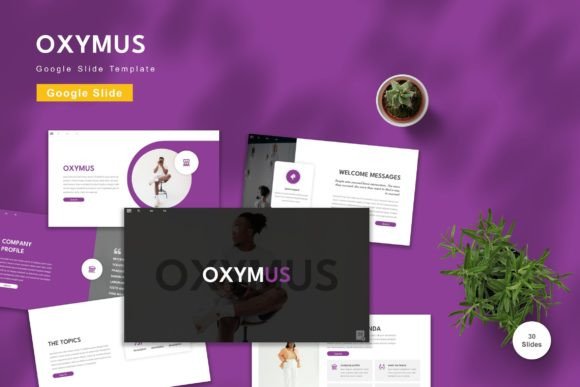
Adopting a new template is not merely about changing colors; it is about standardizing your visual output. The Oxymus template includes 150 total slides across five premade color schemes. This variety is crucial because different contexts demand different emotional tones. A financial report might require the stability of deep blues and grays, while a creative brainstorming session might benefit from vibrant, energetic hues. Having these options readily available allows you to align your visual identity with your specific audience before you even type the first bullet point.
When preparing for a major project or presentation, the initial phase often involves gathering assets and defining the scope. Instead of searching for individual icons, charts, and layout structures separately, Oxymus consolidates these elements into a single, cohesive file. This consolidation reduces friction during the planning stage. You can drag and drop elements easily, knowing that they are vector-based and will remain crisp regardless of scaling. This efficiency is particularly valuable for freelancers and small business owners who must wear multiple hats and cannot afford to spend hours adjusting pixel-perfect alignments.
The Role of Master Slides in Consistency
One of the most powerful yet underutilized features in any slide deck is the Master Slide. The Oxymus template is built on a master slide architecture, which ensures that changes made to the foundational layout propagate throughout the entire presentation. For professionals managing brand consistency, this is a game-changer. If your company updates its logo or shifts its primary brand color, you do not need to manually edit hundreds of individual slides. You update the master, and the entire deck reflects the change instantly.
This feature supports quality control and long-term usability. For educators and corporate trainers who update their materials semester after semester or quarter after quarter, maintaining a clean, organized file structure is essential. The master slides in Oxymus handle the heavy lifting of alignment, font hierarchy, and placeholder positioning. This allows the creator to focus on the pedagogical or informational content, secure in the knowledge that the visual framework remains stable and professional.
Customization and Ease of Use
A common hesitation when adopting pre-made templates is the fear of limited customization. Users often worry that their presentations will look generic or that they will be constrained by rigid design choices. The Oxymus template addresses this by ensuring that all elements are fully editable. You can input your content, replace placeholder images with your own high-resolution photography, and adjust colors to match specific brand guidelines. The use of recommended free web fonts further enhances accessibility, ensuring that your text renders correctly on any device without requiring specialized font installations.
The inclusion of 30 useful slides within the 150-slide pack provides a toolkit for various presentation scenarios. These are not just title and bullet-point slides; they include layouts for data visualization, team introductions, timeline overviews, and comparative analysis. When you are in the midst of a creative process or finalizing a business proposal, having these specialized layouts at your fingertips accelerates the drafting phase. You can experiment with different ways to present the same data, testing which visual approach best supports your narrative.
Furthermore, the template includes animated slides. Animation, when used sparingly and purposefully, can guide the viewer’s attention and improve information retention. Rather than adding complex motion graphics from scratch, which requires advanced skills in software like After Effects, you can utilize the pre-built animations in Oxymus. This allows you to add a layer of polish and professionalism to your delivery without increasing your workload significantly.
Practical Implementation for Different Users
For marketers and entrepreneurs, the Oxymus template serves as a rapid prototyping tool for pitch decks. In the early stages of a venture, speed is critical. You need to iterate on your value proposition and test different messaging strategies with potential partners or investors. The drag-and-drop functionality allows for quick rearrangement of content blocks, enabling you to pivot your narrative based on feedback without redesigning the entire deck. The five premade colors allow you to tailor the deck for different stakeholders, perhaps using a more conservative palette for traditional banks and a bolder scheme for tech-focused venture capitalists.
Educators and trainers can leverage the template to create engaging course materials. The variety of layouts supports different learning styles, combining text, imagery, and diagrams effectively. The widescreen format ensures compatibility with modern projectors and monitors, providing a cinematic viewing experience for students. Additionally, the cloud-based nature of Google Slides means that educators can share links with students for collaborative projects, allowing multiple users to contribute to a single presentation simultaneously. This fosters a interactive learning environment and streamlines the grading and feedback process.
Freelancers and consultants often need to present case studies or project proposals to clients. A well-designed deck acts as a tangible demonstration of your attention to detail and professional standards. Using a template like Oxymus ensures that your proposals look polished and credible, even if you are working under tight deadlines. The readme file included in the package provides essential information on how to get started, reducing the learning curve and allowing you to hit the ground running.
Maximizing Efficiency and Long-Term Value
To get the most out of the Oxymus - Google Slide Template, it is helpful to adopt a systematic approach to file management. Since the package includes five separate Google Slide files for the different color schemes, consider creating a dedicated folder in your cloud storage for your presentation assets. Rename the files clearly to reflect their intended use or color theme. This organization saves time when you need to locate a specific style quickly.
It is also important to note that preview images are not included in the download, so referring to the product page for visual references before starting your work is advisable. Once you have selected your base color scheme, take a few minutes to familiarize yourself with the master slides. Understanding how the placeholders work will prevent frustration later in the design process. Replace the placeholder images with high-quality assets that are relevant to your content. Avoid stretching images disproportionately; instead, use the crop tools within Google Slides to maintain aspect ratios.
Consistency is key to a professional appearance. Stick to one or two font families throughout the presentation, utilizing the hierarchy established in the template. Use bold and italic styles sparingly to emphasize key points rather than entire paragraphs. When using the animated slides, ensure that the transitions support the flow of your speech rather than distracting from it. Practice your presentation with the animations to time your delivery effectively.
Ultimately, the value of the Oxymus template lies in its ability to remove technical barriers to effective communication. By handling the design heavy lifting, it frees you to focus on what truly matters: your ideas, your data, and your story. Whether you are a seasoned executive or a student just starting out, integrating this tool into your routine can lead to more confident, compelling, and visually appealing presentations. Get it now Oxymus - Google Slide Template for All Business and Personal Needs and transform the way you present your work to the world.